Gym fee reminder app: expiry and dues reminders that go out on WhatsApp without you chasing
Calling members about money is the job nobody at a gym enjoys. A WhatsApp message from the system is easier to send and easier to receive, because it is not personal. Jimwala sends the reminders every morning on its own.
-
What goes out automatically
Expiry reminders: 7 days before the plan ends, 3 days before, on the day, and the day after if it lapses.
-
Pick the time, see what is coming
Choose when member reminders go out: morning at 9 AM, afternoon at 1 PM or evening at 5 PM.
-
Your logo on the message
Turn on Your logo on messages and reminders, receipts and notices go out with your gym logo as a banner on top, with the same words.
See WhatsApp reminders in the app
WhatsApp that runs itself
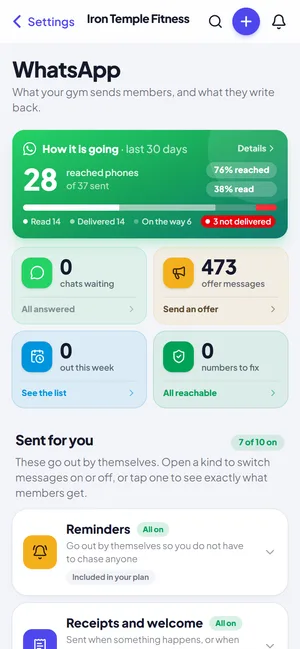
Renewal, dues and receipt messages go out on their own. See how many were delivered and read, and fix the numbers that failed.
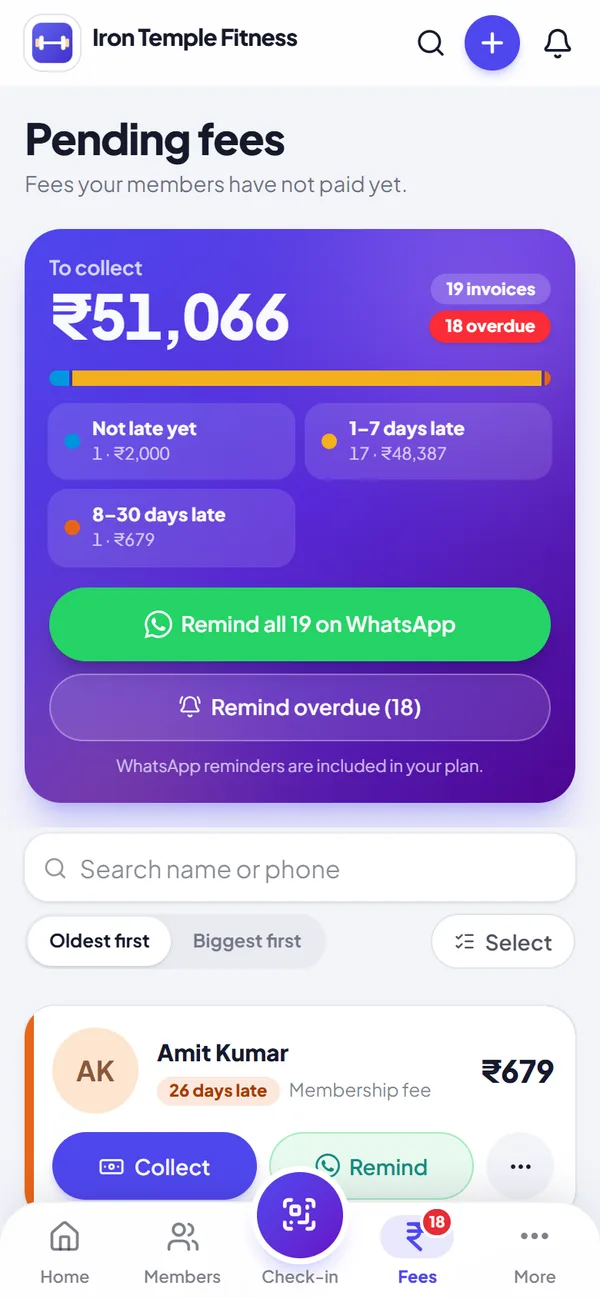
Dues and WhatsApp reminders
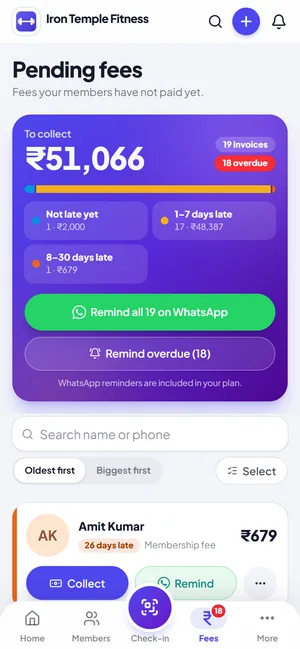
See who owes what, then collect at the desk or remind everyone on WhatsApp in one tap.
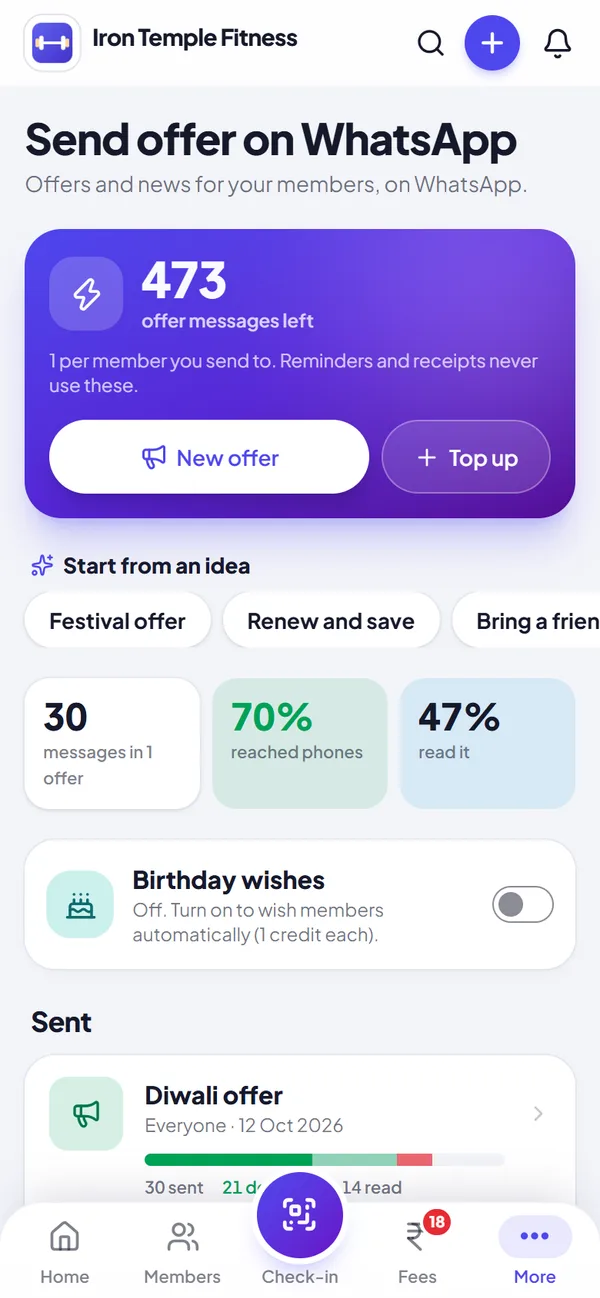
Offers to every member
Send a festive offer or notice with your logo or poster. See who it reached and who read it.
What goes out automatically
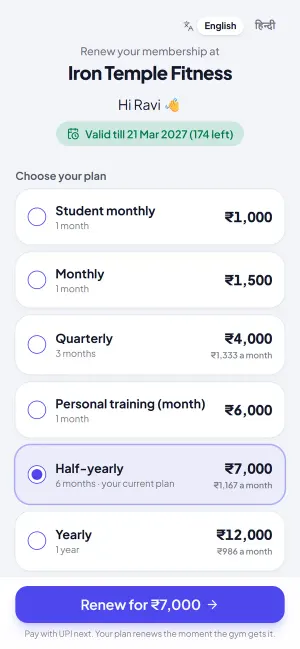
- Expiry reminders: 7 days before the plan ends, 3 days before, on the day, and the day after if it lapses. The message can carry the member's own renewal link, so paying is one tap.
- Pending-fee reminders: the amount owed, plus a payment link once you have added your UPI ID. Until then the message asks the member to pay at the desk.
- A fee-due heads-up two days before a fee falls due, so the payment is not a surprise.
- Payment receipts and a welcome message when someone joins.
- Optional and off until you switch them on: a "we miss you" note to members who have stopped coming, an enquiry thank-you for new leads, and a request for a Google review a month after a member joins.
Pick the time, see what is coming
Choose when member reminders go out: morning at 9 AM, afternoon at 1 PM or evening at 5 PM. Your own daily summary stays at 9 AM.
The Coming up list shows exactly which messages will go to whom over the next 7 days, using the same rules as the daily run, so there are no surprises. The message guide shows the wording in English, Hindi and Hinglish, and Send me a sample puts a real one on your own phone.
Your logo on the message
Turn on Your logo on messages and reminders, receipts and notices go out with your gym logo as a banner on top, with the same words. Until the logo version of a message is approved in a member's language, the plain message is sent, so nothing is lost.
Know what was delivered
The last 30 days screen shows how many messages were sent, delivered and read. When one fails, it is explained in plain words with what to do next.
Numbers to fix lists members WhatsApp cannot reach, with Call, Fix number and "number is right" buttons, and shows the fees pending against each, so a wrong digit does not quietly cost you a renewal.
What you can send yourself
On the Dues page, tick a few members or pick everyone overdue and send the lot at once. Anyone already reminded today is skipped, so you cannot accidentally message the same person twice.
Broadcasts are for offers and notices: a festival discount, a holiday, a timing change. Send to everyone, or only to active, expiring, lapsed or new members, one batch, one plan, or a hand-picked group.
Try whatsapp reminders with your own members, free for 14 days.
Start free trialControl, so it never feels like spam
Every automatic message has its own on/off switch under Settings, Messages: renewal reminders, expiry messages, dues reminders, receipts, birthday wishes and alerts to you. A member who does not want WhatsApp can be switched off individually and is skipped everywhere, including broadcasts.
Birthday wishes are off until you turn them on. They count as an offer message, not a free reminder, because WhatsApp treats them as marketing.
What costs money and what does not
Reminders, receipts and welcome messages are included in every plan, however many go out. Broadcasts and birthday wishes use offer messages. Every plan includes some each month and packs start at 200 for ₹299. A broadcast message that fails to deliver is given back.
A note on wording
Messages are sent through WhatsApp's official business system, using templates that WhatsApp approves in advance. That is why you cannot write a free-text reminder with any wording you like. If you want ideas for your own messages to members, the guide on WhatsApp reminder messages has English and Hinglish examples you can copy.
Remind from your own WhatsApp, free
Besides the automatic messages, Home and Dues have a Remind button that opens a chat in your own WhatsApp with the member's name, the plan end date or the amount owed already typed, in English or Hindi. You press send from your own number, so it uses no message credits and needs no approved template.
How it is going, at a glance
WhatsApp settings open with how your messages are doing in the last 30 days: how many reached phones, how many were read, and how many are still on the way or could not be delivered. Tap the message previews to see exactly how each reminder looks on a phone before it goes out.
Questions about whatsapp reminders
Do my members need to install anything?
No. They get an ordinary WhatsApp message on the number you saved.
Do reminders cost extra?
No. Reminders, receipts and welcome messages are included in every plan. Only broadcasts and birthday wishes use offer messages.
What if a member does not want WhatsApp messages?
Turn WhatsApp off for that member and they are skipped in reminders and broadcasts.
Can I send a message to all members at once?
Yes, with Broadcasts, to everyone or to a group you choose.
Can I turn off one kind of reminder?
Yes. Each has its own switch under Settings, Messages.
Can I choose what time reminders are sent?
Yes. Pick morning (9 AM), afternoon (1 PM) or evening (5 PM) for member reminders.
Can reminders carry my gym logo?
Yes. Turn on Your logo on messages. If the logo version is not yet approved in a member's language, the plain message is sent instead.
How do I know a message reached the member?
The last 30 days screen shows sent, delivered and read, explains failures in plain words, and lists numbers WhatsApp cannot reach so you can fix them.
Can I send a reminder from my own WhatsApp number?
Yes. The Remind button opens your WhatsApp with the message already typed. It is free because you send it yourself.
Guides on whatsapp reminders
- Gym software for small gyms in towns and villages: what you really needA small gym needs fewer features than the brochures say. The short list, and how to start in an afternoon.
- Gym fee reminder message samples for WhatsApp: templates in English and HinglishMessages to copy for expiry, dues, receipts and offers, and how to send them without annoying anyone.
- Best gym software in Nagpur: what a Nagpur gym owner should look forGym software for Nagpur owners: summers, Marathi and Hindi messages, UPI fees and being found in your own locality.
More Jimwala features
- Explore
WhatsApp chats inbox
Send a reminder and members reply: "paid yesterday", "freeze my plan", "what time is yoga?".
- Explore
Gym automation
A gym runs on small repeated jobs: remind the member whose plan is ending, chase the one who still owes, send the receipt, welcome the new joiner.
- Explore
Membership renewals
A new member costs you advertising, time and often a discount.
- Explore
Fee collection and dues
Cash today, UPI tomorrow, half now and half on Saturday.