What your members get on their own phone: plan, payments and self check-in
Without something for members to look at, the front desk answers the same questions all day: how many days are left, what do I owe, can you send my receipt. Each one is a small interruption, and at 6 am they add up. Every member gets their own page that answers them.
-
Two ways in, no app to install
The back of the printed ID card carries a QR code that opens the member's own page.
-
What is on the page
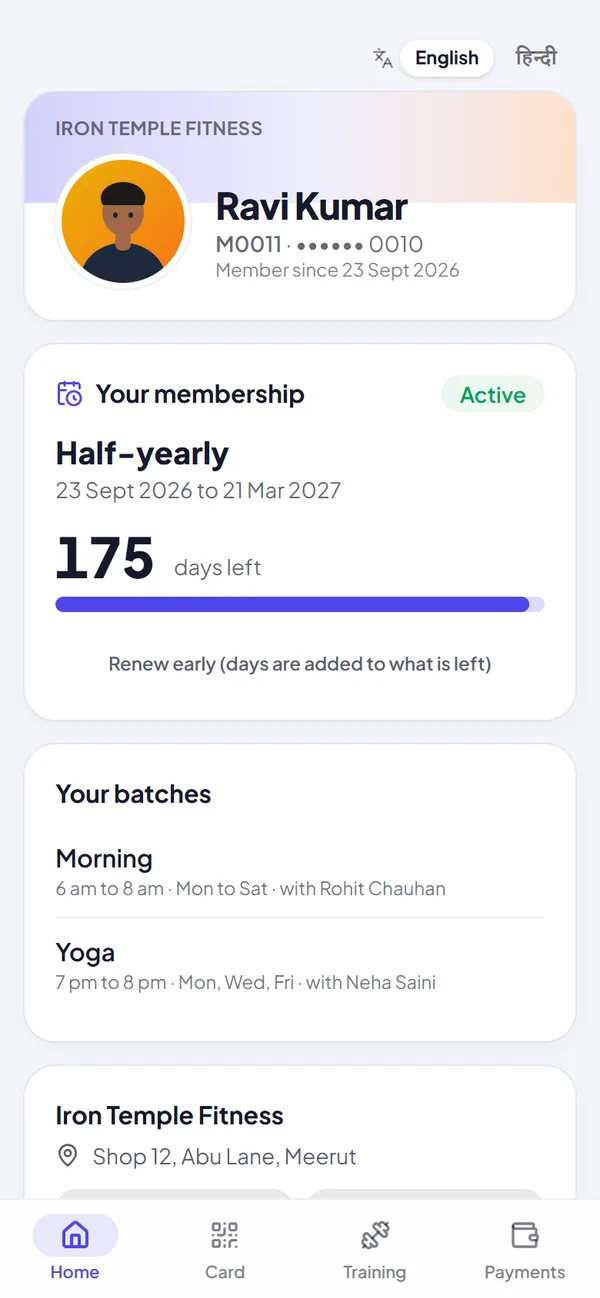
The plan, the dates it covers, days left, and a status: active, ending soon, ended or on hold.
-
Self check-in
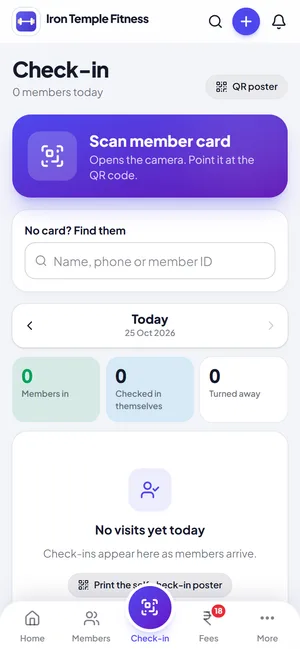
Print the check-in poster from Jimwala and put it at the entrance.
Two ways in, no app to install
The back of the printed ID card carries a QR code that opens the member's own page. You can also send the link on WhatsApp from the member's menu (it opens WhatsApp on your phone with the message typed, so it costs no credits). The address is long and random. The link itself is the key, so there is no password.
Members can also sign in at jimwala.com/member with their mobile number and a 6-digit code on WhatsApp, and add the page to their home screen. It works in English and Hindi, and a phone set to Hindi opens in Hindi.
What is on the page
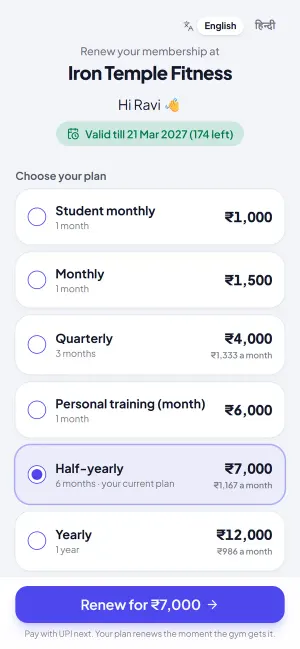
- The plan, the dates it covers, days left, and a status: active, ending soon, ended or on hold. When it is ending there is a Renew button.
- Every payment with date, method, reference and a receipt link. A payment you reversed stays visible, marked as reversed.
- Pending fees, each with a Pay button that opens your UPI payment page.
- Visits this month, a 12-week calendar, a weekly streak and milestones. Seeing their own streak is a small push to keep coming.
- Their batches with timings and trainer, and buttons to call or WhatsApp the gym.
- Their workout and diet plan, if a trainer has given one.
Try member app and member page with your own members, free for 14 days.
Start free trialSelf check-in
Print the check-in poster from Jimwala and put it at the entrance. A member who has signed in once scans it with their phone camera and is checked in under the same rules as your desk. An expired or left member is refused. Their visit shows as "Self" on your list.
The poster only works for the member whose page is saved on that phone, and only while their plan runs. If a photo of the poster starts circulating, generate a new one in one tap and the old one dies.
A member without a smartphone is not left out. The desk can still scan their printed card or search their name.
Booking classes
Members can book a place in a batch up to a week ahead and see how many places are left. More on the class booking page.
What members cannot do, on purpose
The page is read-only. A member can open their renewal page or a UPI payment page from it, but the record changes only when your staff record something. It never shows their full phone number, email, notes or emergency contact, and search engines are told to ignore it.
A payment made through the page is also not automatic. The member taps "Yes, I paid", you get a message, and you tap Received once the money arrives. Payments on UPI go straight to your account and no gym software can see them.
Lost a card? Replace the page link from the member's menu. The old link and the QR on the lost card stop working immediately.
Questions about member app and member page
Do members need an app or a password?
No. The page opens in the browser from the QR or the WhatsApp link. They can also sign in with a WhatsApp code.
What stops someone checking in from home?
The poster works only for the member whose page is saved on that phone, and only while their plan runs. If it is being shared, make a new poster and the old one stops working.
Can a member with no smartphone still check in?
Yes. The desk scans their card or searches their name.
Is it available in Hindi?
Yes. The member page, sign-in, booking, self check-in and payment page can switch between English and Hindi.
Does sending the link cost WhatsApp credits?
No. It opens WhatsApp on your own phone with the message typed, so you are the one sending it.